
AI Responses – Review/Response Pairs
AI Responses – Review/Response Pairs
Review/response pairs are the heart of your AI responses. They define your gold standard: the AI learns your tone, length, structure, and style from these examples. The better your examples, the better the generated responses.
You can find this feature under Location → AI Responses → Review/Response Pairs.
How does it work?
The system works even without review/response pairs – however, the AI responses will be very generic. We therefore recommend a minimum of 10 pairs. The maximum is 15 pairs.
A review/response pair consists of a real review and an accompanying response that you consider exemplary. These pairs largely determine how your future AI responses will be written in terms of style, content, tone, and structure.
Import pairs
If your location already has reviews with responses, you can import them directly. Click on “Choose from your reviews”. A selection window will open, listing all reviews that already have a response.
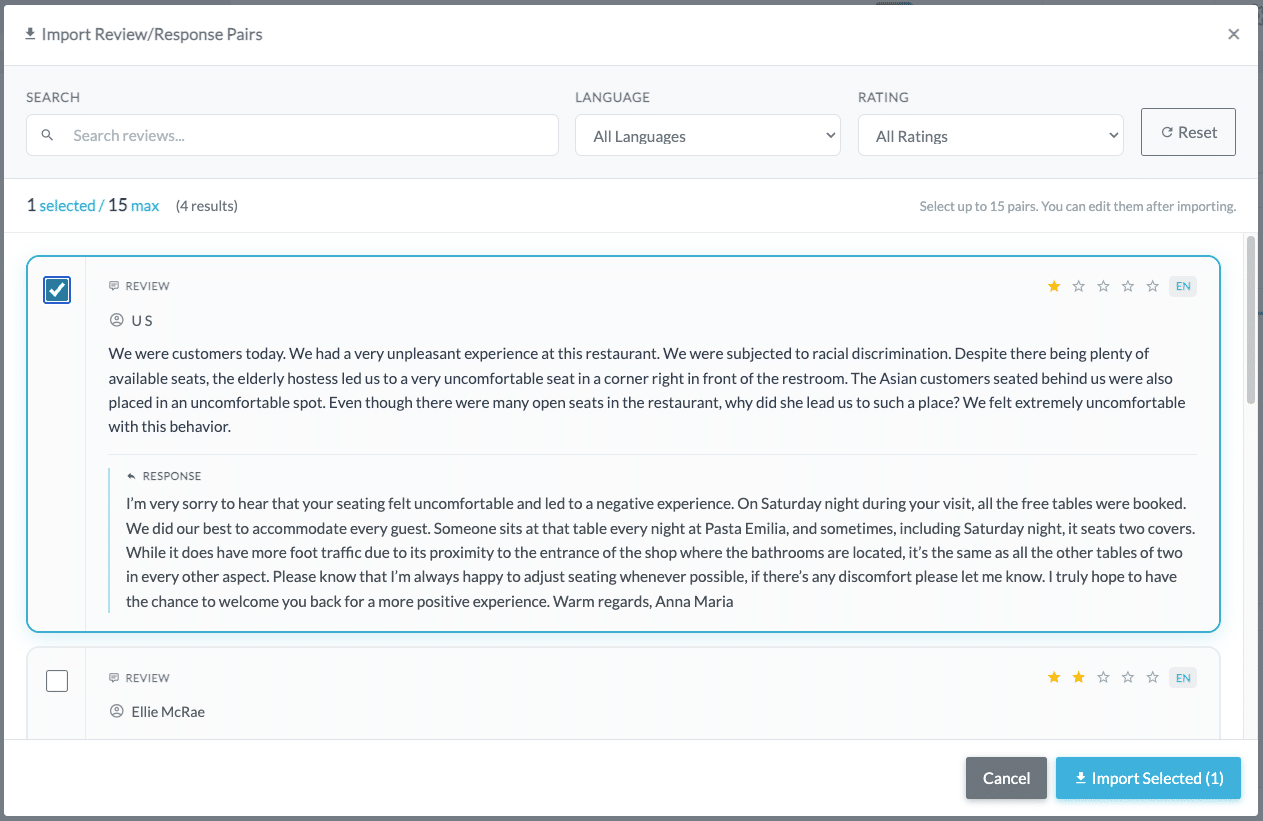
The selection window offers the following filter options:
- Search: Search your reviews by keyword.
- Language: Filter by the language of the review.
- Rating: Filter by star rating.
In the top left, you can see the counter (e.g., “1 selected / 15 max”), showing how many pairs you have already selected. Select the desired pairs by clicking the checkbox and then click “Import Selected”.
After importing, you can edit the imported pairs at any time to further optimize your responses. Use this opportunity to bring your responses up to your desired gold standard.
Note: The selection window only shows reviews that already have a response. Reviews without a response do not appear in the list.
Add pairs manually
If your location does not yet have any reviewed responses, or if you would like to create your own examples, you can add pairs manually. Click on “Add manually” or the “+ Add Pair” button.
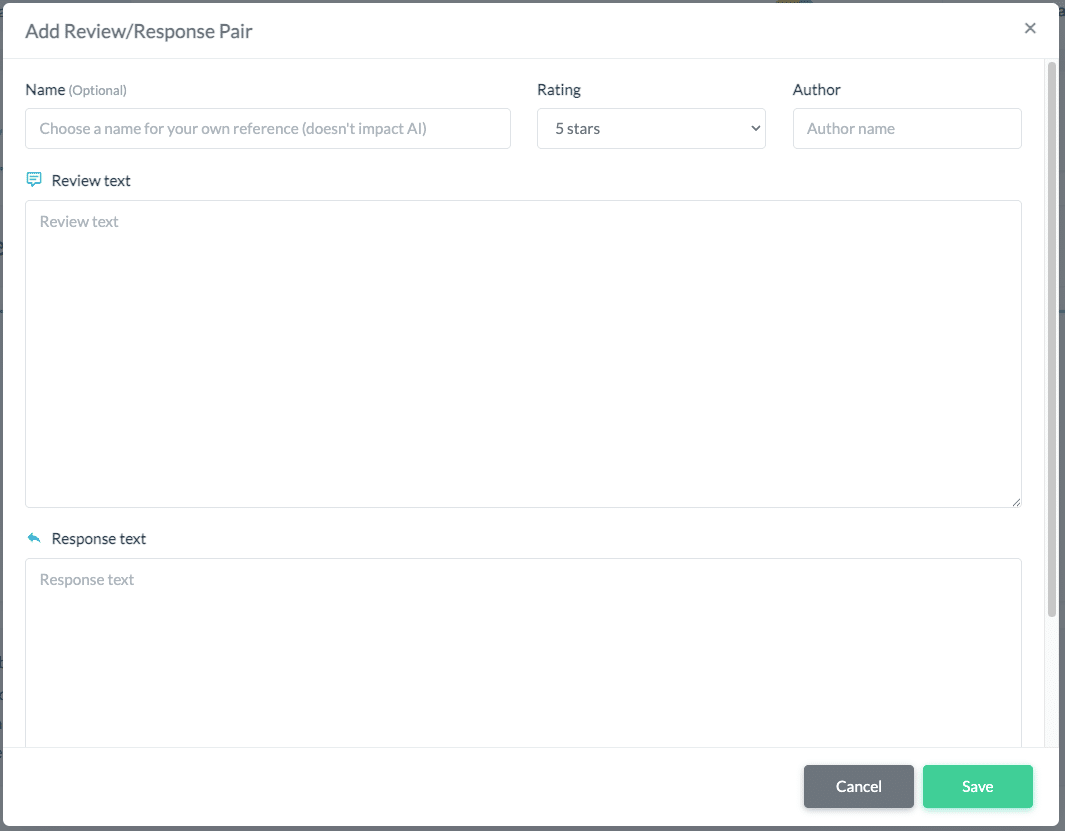
In the dialog window, fill in the following fields:
- Name (Optional): Assign an internal name for easy reference (e.g., “Negative EN” or “Positive DE”). This name is for your own reference only and does not affect the AI.
- Rating: Select the star rating of the example review.
- Author: Enter the author name.
- Review text: Enter the text of the example review.
- Response text: Enter the exemplary response that should serve as your gold standard.
Then click “Save”.
Tips for better results
For the best possible AI quality, we recommend:
- Include both positive and negative reviews. Your AI should know how you respond to both types.
- Use a mix of short and long reviews. This helps the AI learn to adjust the response length appropriately.
- Use examples primarily in your main language. We recommend approximately 80% in your main language and the rest in English, if you receive reviews in multiple languages.
- Use consistent responses. If you add two similar reviews as pairs, their responses should not vary too much in length and style.
Edit and manage pairs
Your review/response pairs are displayed as a list on the page. The following actions are available for each pair:
- Edit (pencil icon): Opens the pair for editing. Here you can adjust the review text, response text, and all other fields.
- Delete (trash icon): Removes the pair from your list.
- Sort: Click on a column header to sort the list.
Important: If you edit an imported pair, the edited version becomes your gold standard – not the originally published response. Use the editing function to further perfect your responses.