
AI Summary
AI Summary automatically analyzes your reviews using AI and summarizes the most important topics – positive, neutral, and negative. You can find it under Analysis > AI Summary.

How AI Summary works
AI Summary evaluates your reviews from the last two months and automatically identifies the most important topics. Unlike Content Analysis, which uses predefined categories, AI Summary freely detects topics from the review text.
- The analysis is updated automatically every two months.
- The period is shown as a fixed window (e.g., May-June, July-August).
- A minimum of 10 reviews in the period is required. Locations with fewer reviews will show a corresponding message.
- AI Summary is currently available for individual locations, not for location groups.
Topic list
The topic list shows the top 10 topics, sorted by frequency. A colored dot indicates the sentiment:
- Green = Positive
- Grey = Neutral
- Red = Negative
The percentage shows the share of reviews mentioning this topic, relative to the currently filtered selection. Click on a topic to see the associated reviews and AI Insight. Use “Show all” to expand the full list.
Filters
You can filter the results by category and sentiment:
- Category dropdown: Filter by a specific category (e.g., Service, Food, Ambiance) or show all.
- Sentiment tabs: Switch between All, Positive, Neutral, and Negative.
The “Reviews analyzed: X of Y” label shows how many reviews are included in the current filter selection.

AI Insight
When you select a topic, the AI Insight shows a short, AI-generated summary of the associated reviews. This summary is displayed in your account language.
Chart
The chart shows the evolution of a topic over time. Each bar represents a two-month window. The chart grows automatically as more periods become available.
Info tooltip
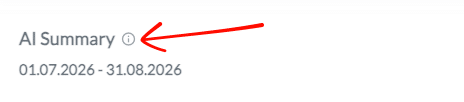
Next to the “AI Summary” heading, you will find an info icon. Click or hover to see information about the current period and the next update date.
Frequently asked questions
Why do I see “Summary not available”?
Your location has fewer than 10 reviews in the current period. Once enough reviews are available, the analysis will be generated automatically.

How often is the analysis updated?
Every two months, on the 2nd of the following month. Example: The analysis for July-August becomes available on September 2nd.
Can I change the period?
No. AI Summary always shows the last completed two-month window. The displayed period is visible in the heading.
Does AI Summary work for groups?
Currently, AI Summary is only available for individual locations.
Are the results accurate?
AI Summary is generated by AI. Results may contain inaccuracies. We recommend verifying against the underlying reviews by clicking the Reviews tab.